Showing posts with label CCNA. Show all posts

Friday, February 6, 2015

6 Feb 2015 CCNA - Chapter 4: 4.4 Media Access Control

4.4 Media Access Control

4.4.1.1
The Media Access Control sublayer determines how data frames are put on the media.

The actual media access control method depends on;

Topology - the connection between nodes
Media Sharing - how the nodes share the media - Point to Point (WAN) or LAN

4.4.1.2 / 4.4.3.1
Review the difference between physical and logical topologies


4.4.2.1

Common WAN topologies:  Point to Point, Hub and Spoke, Mesh

4.4.2.2

Physical Point to Point directly connects 2 nodes (the serial connection between routers)

4.4.2.3


In a logical Point to Point a virtual (logical) connection is made between the nodes, but the physical connection may contain intermediary devices.

4.4.2.4

Data can flow using either Half or Full Duplex communication in a point to point topology

4.4.3.2 / 4.4.3.3

Logical topology is closely tied to how data is is sent and received on the network media.
There are two basic media access control methods for shared media:
  • Contention-based access: All nodes compete for the use of the medium but have a plan if there are collisions. Figure 1 shows contention-based access.
CMSA/CD Wired  802.3 Eithernet
CMSA/CA Wireless 802.11
  • Controlled access: Each node has its own time to use the medium. Figure 2 shows controlled access.
The data link layer protocol dictates which media access control method will provide the appropriate balance between frame control, frame protection and network overhead

New Term:  non-deterministic contention based - a device can attempt to access the medial whenever it has data to send.  CSMA (Carrier Sensing Media Access) prevents chaos.

CD - Collision Detection listens for the presence of a data signal.  No signal - it sends.
CA - Collision Avoidance listens for the presence of a data signal.  No signal - sends an notificaiton of intent to send. Once it receives a clear to transmit, it sends the data.

4.4.3.5

Controlled access method - devices take turns to access the medium.
Token Ring (IEEE 802.5)
Fiber Distributed Data Interface (FFDI)
Both now obsolete

Review the Ring Topology and do Activity 4.4.3.7

4.4.4 Data Link Frame


Please Read the Section

A Data Link Frame has 3 basic parts:  Header, Data and Trailer

But they are formatted differently depending on the protocol used:  Ethernet, PPP or 802.11

Complete Activity 4.4.4.9


Wednesday, January 28, 2015

28 Jan 2015 - Fiber Optic and Wireless

Fiber Optics

 Please follow the link to the quizlet review for 4.2.3 covering
Types of Fiber
Fiber Connectors
Fiber Cables

Fiber Optic Cabling Review - Quizlet

UTP Versus Fiber

Wireless Media

Wireless is not restricted to conductors or pathways and provides great mobility.  However, it does have some concerns when designing a network:

Coverage Area
Interference
Security

4.2.4.2 - Types of Wireless Media

Quizlet Review on Standards:

IEEE 802.11 standards Review

Do: 
Lab 4.2.4. Packet Tracer - Connecting a Wired and Wireless LAN
Email Screenshot to s.grover@msad17.org

Lab 4.2.4.6 Viewing Wired and Wireless NIC Information.
Email Screenshot to s.grover@msad17.orgre

Tuesday, January 27, 2015

27 Jan 15 - CCNA Chap 4 Review 4.2

 Chap 4 Review 4.2 - Network Media

4.2.1 Copper Cabling
Copper Cabling is inexpensive, easy to install and has low resistance to electrical current, but is limited by distance and signal interference.

What is Signal Attenuation?
What are the 2 sources of interference that can distort an electrical pulse?
Define EMI and RFI.  What is Crosstalk?

How can electronic noise on a copper cable be limited?

There are 3 main types of copper media:

  • 4.2.1.3 Unshielded Twisted Pair (UTP) terminated with RJ-45
  • 4.2.1.4 Shielded Twisted Pair (STP) terminated with RJ-45
                      How does it differ from UTP
                      What are the 2 common variations
                      It's popularity declined with the decline of Token Ring networks, but the 10GB Ethernet standard has renewed interest in it.

  • 4.2.1.5 Coaxial Cable

Although UTP has essentially replaced coax, which 2 installation types have adapted for its use?


4.2.1.6  What are the fire and electrical hazards associated with copper cable?

List some best practices to avoid these hazards.


4.2.2 - UTP Cabling

4.2.2.1  Review UTP specs: # of pairs, color-coding, twisting, wire gauge,.....
UTP does not use shielding.  How is the negative effect of crosstalk limited?
          What is Cancellation?
          How does varying the # of twist per wire pair enhance cancellation?

4.2.2.2  What are some of the elements defined by the TIA/EIA-568A standard?
              What distinguishes the difference between CAT 5 and CAT6 cable

4.2.2.3/4 Know the pin outs for straight through and crossover cables.
               Identify a properly terminated cable and a cable with a bad connector.
               When is straight through, crossover or rollover used?
4.2.3 Fiber Optic
How are bits encoded on a fiber optic cable?
Is fiber optic cable susceptible to EMI and RFI?
How is fiber optic used in the following industries:
  •        Enterprise Networks
  •        FTTH and Access Networks
  •        Long-Haul Networks
  •        Submarine Networks
4.2.3.2 - Identify and describe the components of a fiber cable.

Optical fiber is proof tested through a rigorous manufacturing process for strength at a minimum of 100,000 pounds per square inch.

Taking a break - Will link in a couple worksheets comparing multi and single mode fiber, and different connectors 


4 March 2015 - CCNA Chap 4 Review 4.1

Chapter 4 - Network Access  4.1 Physical Layer Protocols


Review

4.0.1.1 -
  • Which 2 layers of the OSI model are so closely tied that the TCP/IP combines them into one layer?
  •  What is the role of the data link layer on the sending device?  What does it do on the receiving device?
4.1.1
Terms related to the physical or wireless connection to a network:  WAP. ISR, LAN, NIC, WLAN

4.1.2
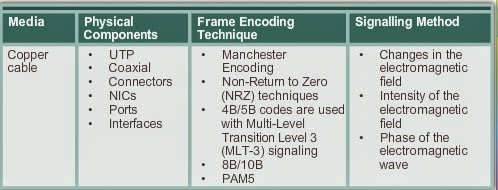
The OSI physical layer provides the means to transport the bits that make up a data link later frame across the network media.

What is the process that data undergoes from source node to destination?
Review the PDU encapsulation process

What are the 3 basic forms of network media?

4.1.3

The 3 functional areas that the physical layer addresses: Physical components, Encoding and Signaling

Define Encoding
Signaling:  
  • What is the difference between Asynchronous and Synchronous signal transmission?
  • What are the 3 commonly used modulation techniques?
  •  
 Define Bandwidth


How does throughput differ from goodput?
What is latency?

4.1.3.4 What role do standards play in defining media?

DO:  4.1.3.5


Thursday, January 30, 2014

3 February 2014 - CCNA


Network Protocols and Communications Summary:

Sums it up quite nicely:


Test!!!!! on protocols and communication!!!

Review:

  • Unicast, Multicast, Broadcast 
  • Protocol rules:  Message timing, Flow control (size), Message format, Delivery options
  • Characteristics of TCP and UDP
  • Protocol Stack
  • Proprietary Protocols vs. Open Standards
  • Standards Organizations
  • Advantages of a layered model
  • TCP - OSI - PDU - Protocols
  • Encapsulation process
  • Frame addressing
  • Default Gateway

Wednesday, January 29, 2014

29 January 2014

If you find the Windows 7 disc, the sleeve is on my desk.


Everybody's work is on this post in the following order:

  • Comp 1 - Operating Systems
  • IC3 - Complete Lesson 1 and 2. 3 is on this post
  • Intro (bottom of the post)- Computer Buying Project - use the rubric


Comp 1 - IT Essentials

Scroll down and find the blog 'ITE - Week Ending 31 Jan 2014' - May have to click older posts.

You are responsible for reading and completing the Study Guide for 5.1 and 5.2

Study Guide can be found on the Google Drive

Video Links for OS lessons:


***Do not work on any equipment.

***If we switch over to generator again today, press the green button by the door to restore power to the room and stop the beeping from the server rack.

  • If you finish this watch a TED Talk or work on your independent project.  
  • Leave a comment on what your project status or the TED that you watch.  Those of you who did not leave a comment about your progress on Monday, will be receiving 1's in your grade book - You may want to add a note to today's work about last class if you want that changed.

IC3


Zach and Donald - Refer to previous Blog entries on Lesson 1 and Lesson 2.

Donald - please send or share your answers to Lesson 1 - grover.comptech@gmail.com

Complete Lesson 2 (according to blog assignment)

Lesson 3 is very short.

Computer Protection

Objectives:
  • Protect computer hardware from theft and damage
  • Safeguard data
  • Identify environmental factors that can damage computers
  • Protect computers from power loss land fluctuation
  • Identify common computer hardware problems
Vocabulary:
  • backup
  • data theft
  • driver
  • encryption
  • humidity
  • ping 
  • power spikes 
  • surge suppressor
  • uninterruptible power supply (UPS)
Assignment:

  • Read Chapter 3 (it is short)
  • Step by Step 3.1
  • Read Summary and Answer Lesson Review Questions
  • Project 3-3.  There have been several high profile hacks lately - think of Target.
Reference sites:


Intro to Programming

Take a look at your previous post.  We are continuing the Computer Buying Project.

Follow the rubric when creating your final project.

Presentations will be Friday!!

Moving on .......

We have explored hardware and are now moving onto data.

Programming is creating a set of instructions that tell the hardware what to do.  We are usually writing programs that collect or manipulate data to produce usable information.

For next class:

What do you think about when you hear the word data?  Where can it be found?  Where does it come from?


Tuesday, January 28, 2014

30 January 2014 - CCNA

Encapsulation


Objective:

  • Explain how devices on a network access resources
  • Understand how messages are segmented, addressed and sent

New Terms:

segmentation
multiplexing
protocol data unit (PDU)
data, segment, packet, frame, bit
data encapsulation
de-encapsulation
network address
source IP address,  destination IP address
data link address
source data link address,  destination IP data link address
Address Resolution Protocol (ARP)
default gateway

Do Before Class

Read all of 3.3 - Moving Data in the Network and the Summary

Do in Class

  • 3.3.1.5 Activity - Identify the PDU Layer
  • 3.3.3.3 Packet Tracer - Explore a Network (graded)
  • 3.3.3.4 Lab - Using Wireshark to View Network Traffic
  • 3.4.1.1 Activity - Guaranteed to work
********Screen Shot Your Work************

Network Protocols and Communications Summary:

Sums it up quite nicely:

28 Jan 2014 - CCNA

CCNA - Chapter 3

OSI Model video link


A good reference 


Today we will complete our rendering of the OSI model on the wall.

Create your own mnuemonic for OSI and PDU models

 Do Lab:  3.2.3.6  Researching Networking Standards

OK - I feel like we have beat this topic to death!!!

On to encapsulation ......

Wednesday, January 22, 2014

22 January 2014

Chapter 3 - Network Protocols and Communications

Read the following:

3.1 The Rules

    .1.1 What 3 elements do all communications methods have in common.

    .1.2  What are protocols?
 
        What details of communication do common computer protocols include?

    .1.3 Bits are encoded into patterns of sounds, light waves or electrical impulses.

    .1.4 - 1.6  Compare encapsulation to addressing a letter/envelope

    .1.7  Unicast, Multicast and Broadcast